
Why remote sites raise the stakes
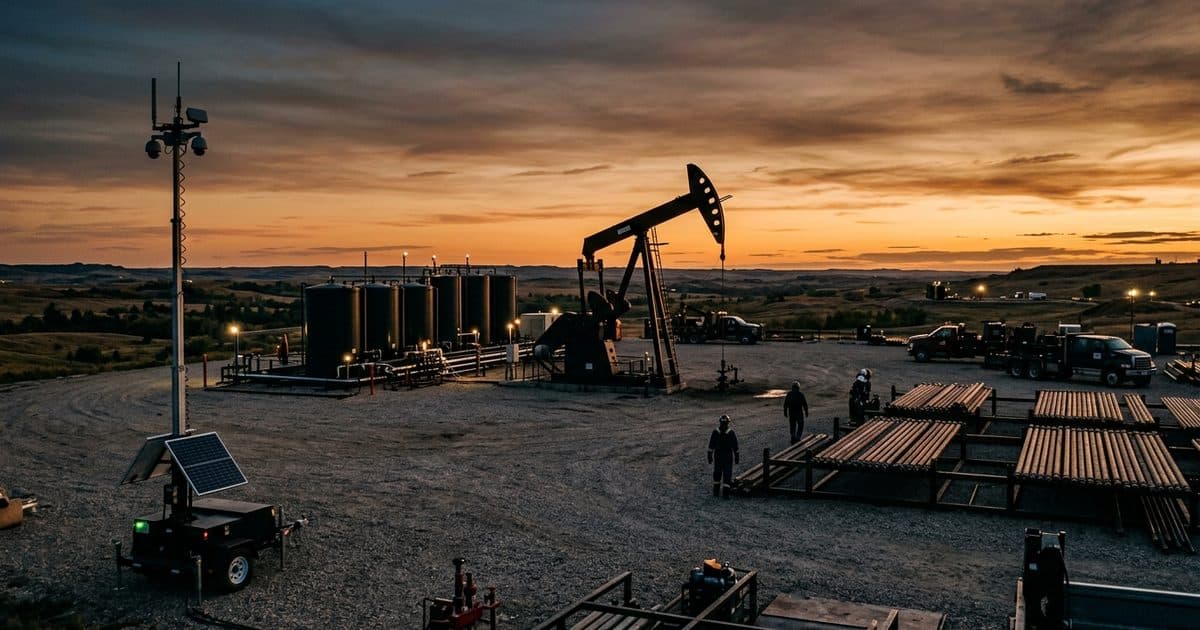
Most workplace safety thinking assumes that a coworker, a supervisor or a passerby is close enough to notice trouble. Remote sites remove that assumption. A person working alone at a pump station, a vacant building, a laydown yard or a pipeline access point may be a long way from help, and a slip, a medical event or an encounter with a trespasser can go unnoticed for hours.
Two kinds of risk tend to overlap. The first is the ordinary hazard of the work itself, such as falls, vehicle incidents, weather, equipment faults and medical problems. The second is the human risk that comes with an unattended property: people looking for copper, fuel or tools, people sleeping on site, or people who simply do not expect to find anyone there. A lone worker can walk into the second risk while managing the first.
Remote sites also tend to have weak communications. Coverage may exist at the gate and disappear at the work area. That is a planning problem to solve early, not a detail to discover during an incident.
Start with a site-specific risk assessment
A generic policy is a starting point. The useful work is walking the site and writing down what could go wrong for one person on their own. A security site risk assessment is a good framework for the security side, and your safety officer will have the equivalent for operational hazards.
Questions worth answering on paper:
- Where is the worker during each part of the shift, and can anyone see that location?
- What is the nearest point with reliable cellular coverage?
- How long would it take for help to arrive from the nearest staffed location?
- What tasks carry the highest injury risk when done alone, and can they be scheduled for times when two people are present?
- Who has reason to be on the property, and who does not?
- What does the worker do if they meet someone unexpected?
Employer duties for lone work vary by state and by industry, and some industries have specific rules. Confirm requirements with counsel or your safety officer rather than assuming a general policy covers you.
Build the check-in plan first
A check-in plan is the backbone of lone worker safety. It answers three things: how often the worker reports in, how they do it, and what happens when they do not.
Keep the plan simple enough that people follow it at 3 a.m. Set a fixed interval tied to the risk of the task, with shorter intervals for higher-risk work. Name a specific person who receives each check-in, with a backup. Write down the escalation steps and the time limits attached to each, including the point at which emergency services are called. The format of a security incident escalation matrix works well here, even though the trigger is a missed check-in rather than an alarm.
Test the plan with a drill. A plan that has never been run tends to fail on its first real use, usually because a phone number is out of date or the person receiving check-ins did not know they were on the hook.
What cameras add, and what they do not
A monitored camera gives a remote person eyes on the site. Used well, that supports lone workers in four ways.
First, it provides awareness. An operator watching the site can notice a vehicle approaching the gate or a person near the work area before the worker does, particularly at night or when the worker is focused on a task.
Second, it provides verification. If a worker reports a problem or misses a check-in, a camera view helps the responder understand what is going on, which shapes whether the right call is a supervisor, a security partner or emergency services. This is the same logic behind video-verified alarm response.
Third, it provides a record. If an incident occurs, video helps establish what happened.
Fourth, it deters. People who know a site is monitored and recorded tend to behave differently.
What cameras do not do is detect a worker's medical emergency in every case, reach into a building or a vehicle cab that is out of view, or fix a communications gap. A camera pointed at a gate says nothing about a person who has collapsed behind a tank. Placement and coverage should be planned around where people actually work, not only around where theft is likely.
Talk-down as a support tool
Live talk-down means a monitoring operator speaks through a loudspeaker at the site. For a lone worker, the value is that the confrontation does not have to be theirs. If an unknown person walks toward the work area, the operator can address them directly, say that the site is monitored and tell them to leave. The worker stays at a distance and does not need to engage.
This works because the message is specific and immediate. A recorded siren or a flashing light is easy to ignore, while a human voice describing what the person is wearing and where they are standing is not. For more detail on how this works in practice, see live talk-down audio deterrence.
Talk-down is not a guarantee, and a worker should never be told to rely on it in place of leaving a situation that feels unsafe. The written plan should say plainly that the worker's first option is always to move to safety and call for help.
Quick reference for lone worker layers
| Layer | What it does | Where it falls short |
|---|---|---|
| Risk assessment | Identifies hazards and high-risk tasks before the shift | Only as current as the last site walk |
| Check-in schedule | Detects that something is wrong when a report is missed | Detection is delayed by the length of the interval |
| Communication device | Lets the worker call for help | Depends on coverage and on the worker being able to use it |
| Monitored cameras | Gives a remote person eyes on the site and a record of events | Cannot see outside the field of view |
| Live talk-down | Lets an operator address an intruder without the worker engaging | Not a guarantee, and not a substitute for leaving |
| Escalation plan | Defines who is called, in what order, with what time limits | Fails if contacts are not current or drilled |
Covering the gaps at sites without power or signal
Many remote sites have no grid power and no internet, which rules out standard fixed cameras. Self-contained equipment is one answer. If you are weighing options, oil and gas security cameras covers how remote energy sites are typically approached, and the same logic carries over to other remote work.
How VDS fits
VDS builds solar-powered mobile surveillance trailers that need no site power, internet or trenching. Each unit carries a 5MP PTZ camera with 25x optical zoom and three 8MP wide-angle cameras on a 22 ft telescopic mast, with dual-SIM 4G/5G cellular connectivity. AI detection flags people and vehicles, and a 24/7 US-based security operations center verifies events and can speak to a person through the unit's loudspeaker. If the situation warrants it, the operator sends video to police dispatch.
That gives a lone worker a watching presence at the site, so people, yours or your security partner's, handle verified incidents. It sits alongside your check-in plan and does not replace it. To talk through a specific site, call (410) 401-1986 or get in touch, and see the mobile surveillance unit for hardware details.