
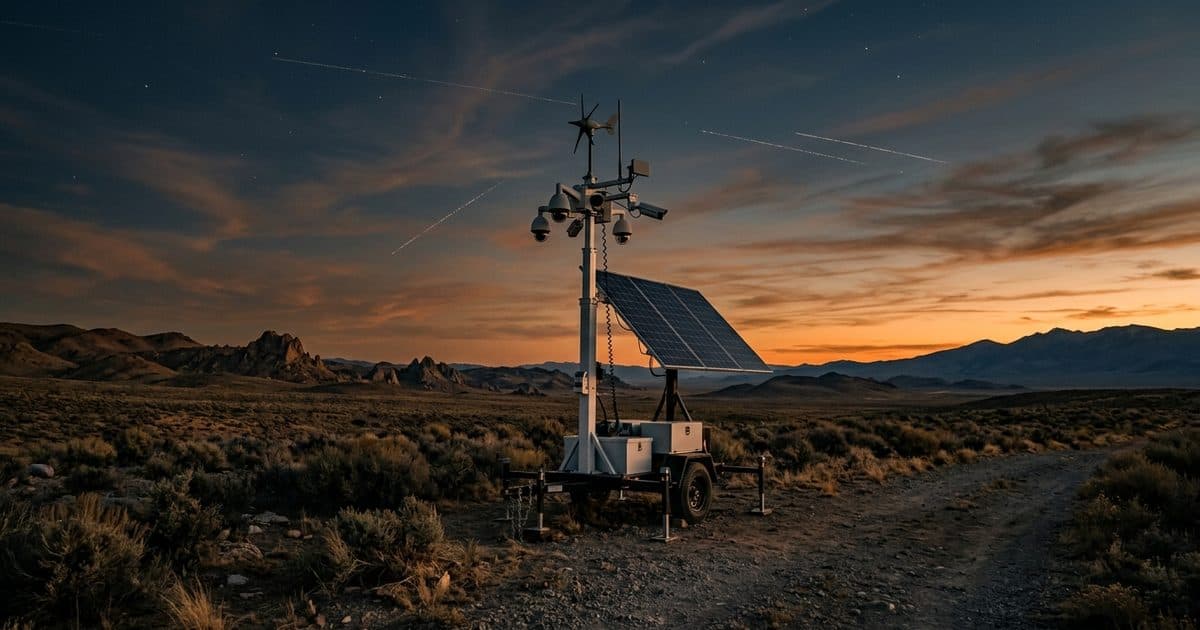
This guide compares each option and covers cellular data, solar sizing, and the limits of consumer cameras on commercial sites. For jobsite-specific setups, see construction site cameras with no WiFi.
Key takeaways
- No Wi-Fi: use cellular LTE/5G, local recording, a point-to-point wireless bridge, or (rarely) satellite.
- No power: use solar plus battery, a generator, or battery-only cameras for short-term needs.
- Consumer solar cellular cameras suit a single gate or shed. They struggle with large sites, winter sun, data limits, tampering, and response.
- Cellular data is manageable when cameras record full quality on site and send only AI-verified events and on-demand live view.
- Solar surveillance trailers combine power, connectivity, multiple cameras, analytics, and monitoring in one unit for sites that need real protection.
Can a security camera work without Wi-Fi?
Yes. Wi-Fi is only one way to move video off a camera. Remote sites typically use one of four alternatives.
1. Cellular (LTE or 5G). The camera or an attached modem uses a SIM card and a data plan to send alerts, clips, and live view over the mobile network. This is the most common answer to "what security camera works without Wi-Fi" for job sites and rural property. The requirement is usable cell signal at the camera location, not just at the site entrance. Check signal where the camera will be mounted, at mounting height, before committing.
2. Local-only recording. The camera writes video to a microSD card or to a network video recorder (NVR) on site. No internet is needed. The trade-off is that nothing reaches you in real time: no alerts, no live view, and no response. You only find out what happened after someone pulls the footage. And if a thief takes the camera or recorder, the footage leaves with it.
3. Point-to-point wireless bridge. A pair of directional radios links the camera location to an existing wired network, such as an office, shop, or pump house, that can be a long distance away with clear line of sight. This works well for permanent outbuildings or a yard next to a connected building. It needs power at both ends, line of sight, and someone to aim and maintain the radios.
4. Satellite. Satellite internet can serve sites with no cell coverage at all. It adds equipment, power draw, and cost, and it's usually reserved for truly off-grid locations.
For most commercial remote sites, cellular is the practical default, with local recording as the backup that preserves full-quality footage.
Can a security camera work without power?
A camera still needs electricity. "Without power" means without a utility connection, so the power has to come from somewhere else.
Solar plus battery. A solar panel charges a battery during the day, and the battery runs the camera, modem, and any lighting overnight. This is the standard setup for a solar cellular security camera and for solar surveillance trailers. It works year-round only when the panel and battery are sized for the location's worst months, not its best.
Generator. Fuel generators can power cameras at sites with no grid connection, but they need refueling, make noise, are theft targets themselves, and a camera system that goes dark when the tank runs dry isn't a security system. They're better as temporary backup than as primary power.
Battery-only. Some cameras run for weeks or months on internal batteries by sleeping until motion wakes them. That extends runtime but means slower wake-up, missed early frames, and no continuous recording. Battery swaps also require regular site visits.
If you need to add solar power and cellular connectivity to cameras at a fixed mounting spot, a solar kit is one route. If you need the whole system to show up and run on its own, a solar-powered mobile surveillance unit packages power, connectivity, and cameras together.
Options compared: cameras for sites with no Wi-Fi or power
| Option | Live view | Alerts | Monitoring | Coverage area | Setup | Best for |
|---|---|---|---|---|---|---|
| Standalone solar cellular camera | Yes, if signal and data allow | Phone app notifications | Usually self-monitored | One view: a gate, shed, or single entry | Mount on a pole or wall, insert SIM, pair app | Small, low-value areas an owner can watch personally |
| Local-recording camera (SD card or NVR) | No | No | None; review after the fact | One to a few views | Mount, power, record | Evidence backup; sites where after-the-fact review is enough |
| Wireless bridge to an existing network | Yes | Yes, via existing system | Whatever the connected system provides | Depends on cameras connected | Radios, line of sight, power at both ends | Permanent outbuildings or yards near a connected building |
| Solar surveillance trailer | Yes, multiple cameras | AI-verified events | Can include 24/7 professional monitoring with talk-down and dispatch | Wide area from an elevated mast; relocatable | Towed in and raised on site | Job sites, lots, farms, substations, vacant property |
The deciding question is usually not "which camera works without Wi-Fi" but "who acts when the camera sees something." A camera that sends a notification to a superintendent's phone at 2 a.m. is a different tool from one backed by an operator who can talk down an intruder and call police.
Limits of consumer cellular cameras on commercial sites
Consumer solar cellular cameras are built for a driveway or a cabin. On a construction site, equipment yard, or substation, several limits show up quickly.
- Single field of view. One camera covers one angle. Construction sites, farm yards, and lots have multiple entry points, material staging areas, and equipment parking. Covering them means many separate devices, apps, data plans, and batteries.
- Small solar panels and batteries. A small integrated panel may keep up in summer but fall behind during short winter days and multi-day overcast weather. Once the battery drains, the camera goes dark exactly when nights are longest.
- Data caps and throttling. Consumer plans often limit data, which pushes cameras to lower resolution, shorter clips, or delayed uploads. That can leave you with footage too soft to identify a person or vehicle.
- Theft and tampering. A camera mounted within reach can be unscrewed, spray-painted, or knocked down. The same people stealing copper, tools, or fuel are not deterred by a device they can remove in seconds.
- Alerts without response. Motion alerts from wind, animals, and headlights pile up, people stop checking them, and a real incident gets missed. Even a real alert still depends on someone waking up, judging the situation, and calling police. There is no verified response.
Consumer cameras still fit small, low-risk spots. Larger commercial sites need a system built for the job.
Cellular data considerations
Cellular connectivity is what makes remote cameras useful in real time, and data use is the main thing to plan around.
Video bitrate drives data. Higher resolution, higher frame rates, and busy scenes (moving trees, traffic, rain) all increase the bitrate a camera produces. Efficient compression reduces it, but a high-resolution stream running around the clock will still use far more data than most plans are designed for.
Motion-triggered vs. continuous. Continuous streaming over cellular is rarely practical. The common approach is to record continuously on site at full quality and send only event clips, snapshots, and on-demand live view over LTE. You keep complete footage locally while using the cellular link only when it matters.
Analytics at the edge cut data. Basic pixel-change motion detection triggers on wind, shadows, insects, and headlights, and every false trigger can send data. AI detection that runs on the camera or on-site hardware classifies people and vehicles before anything is uploaded, so the link carries real events instead of noise. This also keeps monitoring operators focused on activity that matters. See how AI video analytics and false alarm reduction work together.
Signal strength varies by spot. Coverage maps are a starting point. Terrain, steel, and tower distance change signal at the mounting point; external antennas and height often help.
Retention and retrieval. Decide how long on-site footage is kept and how you pull longer clips when an incident needs review. Our guide on how long security cameras should keep footage covers typical retention periods.
Solar sizing and winter performance
A solar security camera system is only as reliable as its worst week. Sizing comes down to three things:
- Daily energy use. Cameras, IR illuminators, analytics hardware, the LTE modem, and any lights or speakers all draw power around the clock. More cameras and more processing mean more energy.
- Sun available in the worst month. Winter days are shorter, the sun sits lower, and northern and cloudy regions get much less usable solar energy than summer figures suggest. Size the panel for December, not June.
- Battery reserve for cloudy stretches. The battery has to carry the full load through consecutive overcast days and then recover. A system that barely breaks even on a sunny day will drain during a storm week.
Placement matters too. Face the panel toward the sun without shade from buildings, trees, or stacked materials, and keep snow and dust off it. For a detailed look at runtime, reserve, and seasonal planning, see our guide to solar security camera battery life.
This is where commercial equipment separates from consumer units. VDS trailers use a 900W bifacial solar array and an 11.8 kWh LiFePO4 battery bank with reserve for 3–5 consecutive cloudy days, sized to keep cameras, AI detection, and cellular connectivity running through bad weather rather than just good weather.
When a solar surveillance trailer makes sense
A solar surveillance trailer packages what a remote site otherwise has to assemble piece by piece: solar power, batteries, cellular connectivity, multiple cameras, an elevated mast, analytics, and monitoring. It tends to be the better fit when:
- The site is large or has several entry points. An elevated mast with multiple cameras sees over fences and materials and covers ground that would take many standalone cameras.
- Assets attract organized theft. Copper, wire, fuel, tools, and heavy equipment draw repeat offenders who plan around small cameras. Utility sites face this constantly; see copper theft prevention at substations and VDS solutions for utilities.
- You need response, not just recordings. When the goal is stopping an incident in progress, cameras need 24/7 remote monitoring with operators who can verify and act.
- The site changes or moves. Construction phases shift, harvest seasons move equipment, and vacant properties sell. A trailer relocates with the work instead of being abandoned on a pole.
- There's no time or budget for infrastructure. No trenching, power drops, network runs, or permits for temporary placement.
- Rural and agricultural property with long distances between buildings, equipment spread across fields, and no connectivity. See VDS for agriculture.
For permanent spots where you can mount cameras on an existing structure, pairing cameras with a solar kit may be enough. For a broader overview of how trailers are deployed and managed, see our remote surveillance trailer guide.
How VDS covers sites without Wi-Fi or power
Vision Detection Systems builds remote surveillance for sites where there is no power, no internet, and no one on site after hours.
- Self-powered and self-connected: a 900W bifacial solar array, an 11.8 kWh LiFePO4 battery bank with reserve for 3–5 consecutive cloudy days, and dual-SIM 4G/5G cellular. No site power, internet, trenching, or permits for temporary placement.
- Coverage from height: a 5MP PTZ and three 8MP wide-angle cameras on a 22 ft telescopic mast (30 ft available), with AI detection for people, vehicles, loitering, objects, and license plates.
- Verified response: a 24/7 US-based security operations center reviews AI-flagged events and escalates from live talk-down to police dispatch.
- Evidence-ready video with managed retention, on NDAA Section 889 compliant hardware.
- Flexible terms: rent a mobile surveillance unit or choose a month-to-month or term subscription. For fixed locations, ask about the solar kit.
Deployments typically go from signed quote to live monitoring in about a week, and on-site setup takes one person under 20 minutes. Tell us about your site and get a coverage plan, or call (410) 401-1986.