
Why cameras are worth considering
Houses of worship are open to the public, often unstaffed during the week, and sometimes hold evening events or services at times when the surrounding area is quiet. Their property typically includes a large parking lot, side doors, storage rooms and sometimes a school or community hall. These features create several kinds of risk: vehicle break-ins, theft of equipment and donations, vandalism, trespass and, for some communities, threats directed at the congregation.
A camera system will not remove every risk. It can deter some incidents, record what happens, and, when monitored, bring a faster response. Our article on whether security cameras deter crime looks at the evidence.
Where cameras help most
Start with the places where activity is predictable and the benefit is clear.
- Parking lots. This is where most incidents happen. A 2019 systematic review of 76 studies found that camera systems in parking lots were associated with about a 37% reduction in crime, a larger effect than the roughly 13% average across all settings. See our parking lot security guide.
- Main entrances and exits. Cameras here show who comes and goes and give greeters and safety teams a view of the approach.
- Side doors, loading areas and rear access. These are less watched and often unlocked for deliveries.
- Storage and equipment rooms. Sound systems, instruments and supplies can be targets.
- Perimeter and grounds. Fences, gates and the edges of the property show who arrives from the street.
Interior cameras in sanctuaries and prayer halls are a different matter, and many congregations choose not to place them there. Keep them in lobbies and corridors if at all.
Keep it welcoming
The goal is to feel safe, not watched. A few practices help.
- Be open about it. Tell the congregation that cameras are present, where they are, and what they are for.
- Cover entries, not seats. Aim cameras at doors, walkways and lots, not at worshippers.
- Use plain signs. A simple, polite sign is better than an alarming one.
- Involve leadership. Decisions about coverage should come from the board or leaders, not one person.
- Respect sensitive spaces. Do not point cameras at restrooms, changing areas, nurseries or counseling rooms.
Some communities may have specific concerns about being filmed during services or worship, and those views deserve to be heard before a system goes in.
Events and volunteers
Services, holidays, weddings, funerals and community meals bring large crowds, extra vehicles and unfamiliar faces. Many congregations rely on volunteers such as greeters, ushers and parking teams. Volunteers are valuable for awareness and welcome, but they cannot sit watching screens while also serving, and not everyone is comfortable acting as security.
A workable division of labor is to let volunteers do what people do best, which is greeting, noticing and knowing the congregation, while cameras and, if used, a monitoring service handle watching the property. Give volunteers a simple plan covering who to call, what to do if someone is acting strangely, and when to contact police. For large one-off gatherings, a temporary unit can add coverage; see mobile surveillance trailers for events. For a comparable setting with many visitors and young people, our guide to school campus security cameras has useful parallels.
Monitoring after hours
Most break-ins and vandalism happen when nobody is around. Recording alone means you find out in the morning. Professional monitoring means an operator can verify an alert, speak to the person through a loudspeaker and contact police with video. In the same 2019 review, actively monitored systems were associated with about a 15% reduction in crime, while recording-only systems showed no significant effect. The cameras do the watching, so people, yours or your security partner's, handle verified incidents. Learn more about remote video monitoring.
Privacy and policy
Write a short camera policy and keep it with other governing documents. It should say what is recorded, where cameras are, who may view footage, how long it is kept, how requests from members or police are handled, and how the system is maintained. Rules about video, audio recording and signage vary by state, so confirm with counsel before installing, and see our overview of business security camera laws. Do not record audio without checking the rules that apply to you.
Limit access to a few named people, keep passwords secure and review the policy once a year.
Paying for security
FEMA runs a Nonprofit Security Grant Program that some houses of worship and other nonprofits may be able to use for security improvements. Eligibility, allowable costs and application requirements change, so check the current notice of funding on the FEMA grants site and confirm with your state administrative agency before planning around it.
Quick reference
| Area | Why it matters | Practical approach |
|---|---|---|
| Parking lot | Highest incident area | Cover entrances, aisles and the street edge |
| Entrances | Show arrivals and departures | Place at doors, not over seating |
| Side and rear doors | Often unwatched | Cover with detection after hours |
| Events | Crowds and unfamiliar faces | Volunteers plus cameras and a call plan |
| After hours | Nobody on site | Monitoring with live response |
| Privacy | Trust of the congregation | Written policy and visible signs |
| Funding | Budgets are tight | Check current FEMA notice |
How VDS fits
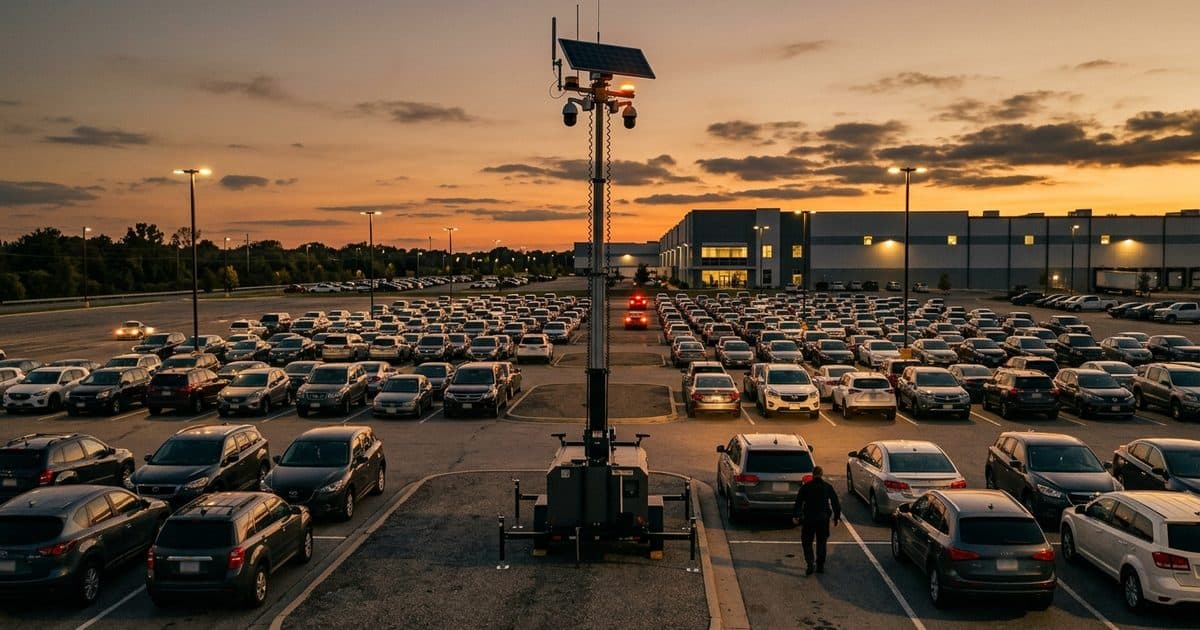
For a large lot or a property with no easy way to run cable, the VDS mobile surveillance unit is a solar-powered trailer that needs no site power, internet or trenching. It carries a 5MP PTZ with 25x optical zoom and three 8MP wide-angle cameras on a 22 ft telescopic mast (30 ft available), a 900W bifacial solar array charging an 11.8 kWh LiFePO4 battery bank, and dual-SIM 4G/5G cellular. AI detection covers people, vehicles, loitering, objects and license plates. A 24/7 US-based security operations center verifies events and responds with live talk-down, then police dispatch with video. Rental, month-to-month and term subscriptions are available. Talk to our team or call (410) 401-1986.
Sources
- Piza, E. L., Welsh, B. C., Farrington, D. P., & Thomas, A. L. (2019). CCTV surveillance for crime prevention: A 40-year systematic review with meta-analysis. Criminology & Public Policy, 18(1). onlinelibrary.wiley.com